ソース – WPForms
現在のバージョン: 1.1.0
WPForms は、WordPress向けの主要なドラッグ&ドロップフォームビルダープラグインです。使いやすいインターフェースと強力な機能で広く認識されています。この拡張機能を使用すると、WPFormsの入力情報をSearchWPのカスタムソースとして利用でき、SearchWPでWPFormsの入力情報を検索できるようになります!
WPFormsの入力情報をSearchWPのインデックスに追加する
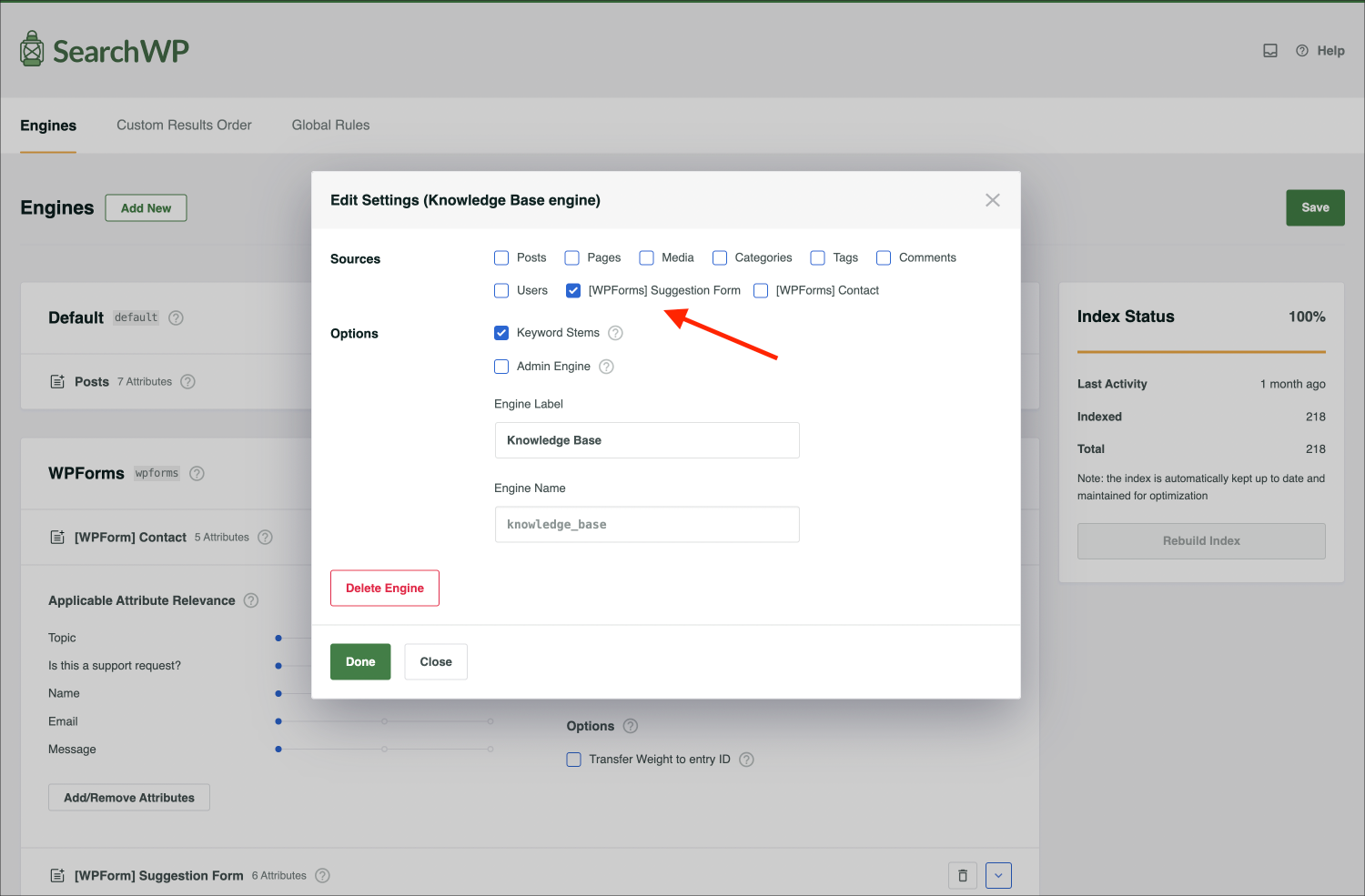
SearchWP Source – WPForms 拡張機能がインストールされ、有効化されると、WPFormsのフォームがSearchWPエンジンのソースリストに表示されます。
注意: このカスタムソースは、補足エンジン でのみ使用できます。
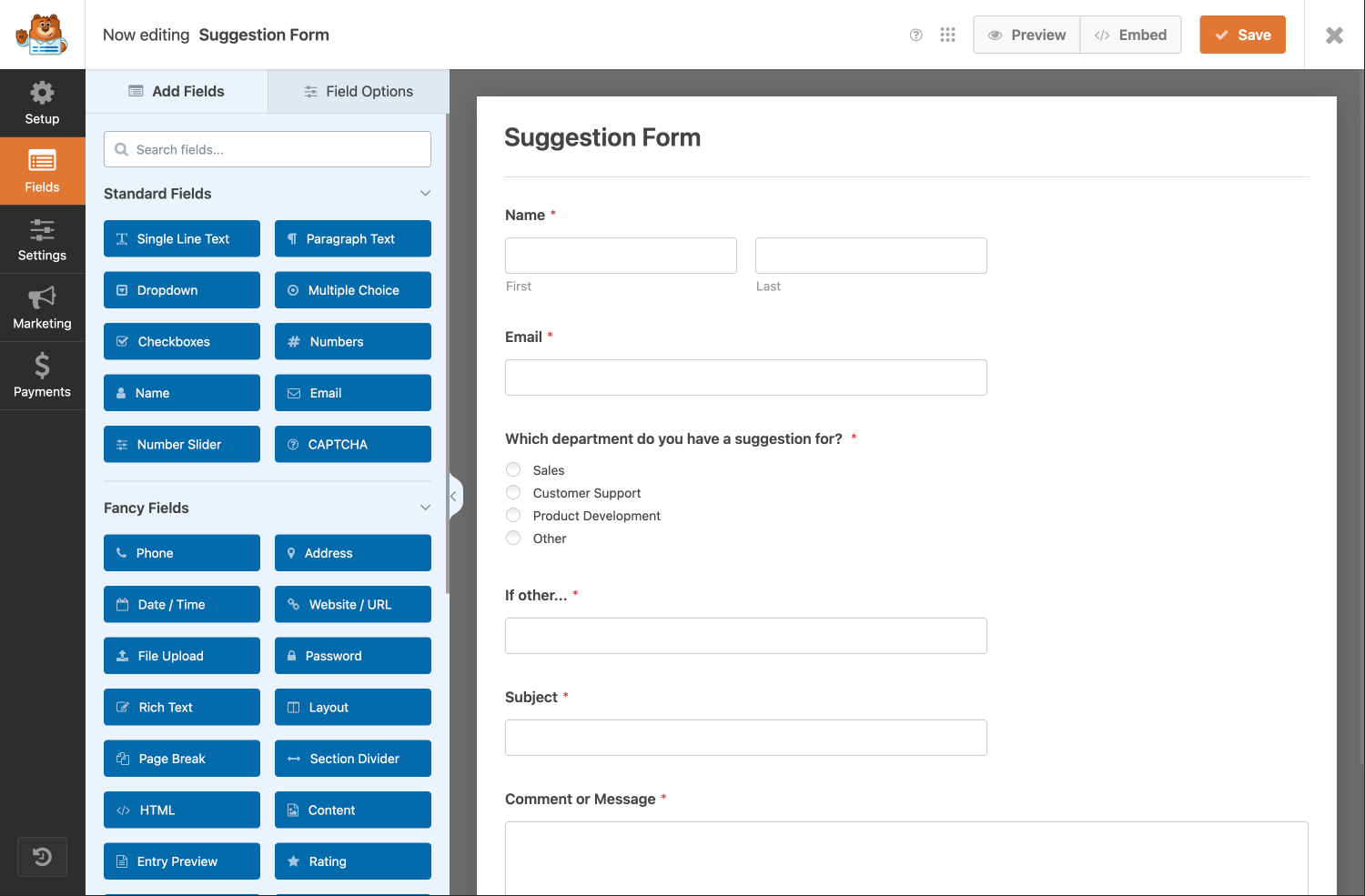
たとえば、ウェブサイトに「提案リクエスト」エリアを作成し、WPFormsの「提案フォーム」を使用して入力情報を収集しているとします。
SearchWP を利用して、顧客が独自の送信を行う前に既存のエントリを検索できるようにすることで、重複を作成するのではなく、既存の送信にアップボートで参加できるようになります。
最初のステップは、提案フォームをソースとする新しい補足エンジンを作成することです。
必要に応じて、同じエンジンに複数のWPFormsのフォームを追加できることに注意してください。
フォームがSearchWPエンジンに追加されると、検索可能なすべてのフォームフィールドがエンジンのソースの属性として追加されます。検索したいフィールドのリストを変更するには、属性の追加/削除 をクリックできます。
WPFormsの入力情報を結果として表示する
SearchWP Source – WPForms 拡張機能により、WPFormsの入力情報が検索結果として利用可能になります。これは、補足エンジン を操作する際に、他のソースと同様に統合されます。
WordPress の API がやり取りする WP_Post オブジェクトの配列である The Loop を持つネイティブ WordPress 検索とは異なり、補足エンジンの結果セットは任意の SearchWP ソースオブジェクトで構成できます。
WPFormsはフォーム入力情報にstdClassを使用します。便宜上、SearchWP Source – WPForms はラッパーオブジェクトで結果を返します。
\SearchWP\Sources\WPForms\Entry
これは、結果配列を反復処理する際に役立ちます。
This file contains hidden or bidirectional Unicode text that may be interpreted or compiled differently than what appears below. To review, open the file in an editor that reveals hidden Unicode characters.
Learn more about bidirectional Unicode characters
<?php
$searchwp = new \SearchWP\Query( 'marketing', [
'engine' => 'wpforms',
'fields' => 'all',
] );
foreach ( $searchwp->results as $result ) {
switch ( get_class( $result ) ) {
case 'SearchWP\Sources\WPForms\Entry':
$form_id = $search_result->form_id;
$entry_id = $search_result->entry_id;
// NOTE: WPForms Field values are stored in the entry fields property as an array.
// Each field has the array key equal to the order they were added to the form editor.
$fields = $search_result->fields;
?>
<div class="result">
Form ID: <?php echo esc_html( $form_id ); ?><br>
Entry ID: <?php echo esc_html( $entry_id ); ?><br>
Name: <?php echo esc_html( $fields[0]['value'] ); ?><br>
Email: <?php echo esc_html( $fields[1]['value'] ); ?><br>
Subject: <?php echo esc_html( $fields[5]['value'] ); ?><br>
Comment: <?php echo esc_html( $fields[2]['value'] ); ?><br>
</div>
<?php
break;
default:
// Another Source was added to the SearchWP Engine.
print_r( $result );
}
}
注意: このフックを使用して、SearchWPが結果をクラスでラップするのを防ぎ、代わりにstdClassを返すことができます。
This file contains hidden or bidirectional Unicode text that may be interpreted or compiled differently than what appears below. To review, open the file in an editor that reveals hidden Unicode characters.
Learn more about bidirectional Unicode characters
<?php
add_filter( 'searchwp\source\wpforms\entry\raw', '__return_true' );
SearchWP Source – WPForms を使用すると、WPFormsの入力情報をSearchWPで検索可能にできます!必要に応じて、複数のSearchWPエンジンと複数のWPFormsソースを作成し、それぞれ独自のフィールド構成を設定できます。SearchWPの強力な検索アルゴリズムを使用して、WPFormsの入力情報を検索可能にしましょう!
変更履歴
1.0.0
[新機能] SearchWPテンプレートを使用して、検索結果にWPFormsの入力情報を表示します。
1.0.0