



高度なカスタムフィールド(ACF)リレーションシップフィールドの検索をインターセプト
高度なカスタムフィールドには、リレーションシップフィールドに検索入力を追加するオプションがあります。
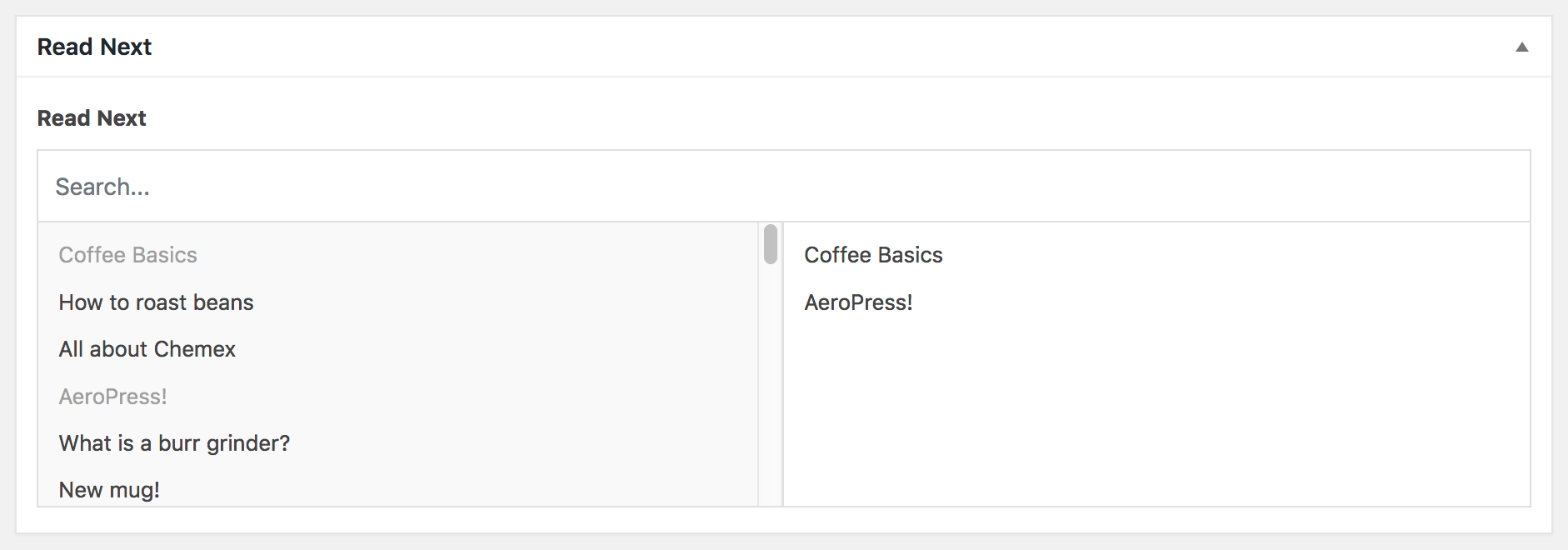
デフォルトでは、SearchWPはこれらの検索をインターセプトしませんが、このスニペットを使用するとそれが可能になります。
This file contains hidden or bidirectional Unicode text that may be interpreted or compiled differently than what appears below. To review, open the file in an editor that reveals hidden Unicode characters.
Learn more about bidirectional Unicode characters
| <?php | |
| function my_searchwp_acf_relationship_field_search( $args, $field, $post_id ) { | |
| if ( empty( $args['s'] ) || ! class_exists( 'SWP_Query' ) ) { | |
| return $args; | |
| } | |
| // Assume that the SearchWP engine to use is the defined admin search engine | |
| // from SearchWP's engine settings. | |
| $admin_engine = \SearchWP\Settings::get_admin_engine(); | |
| $engine_name = ! empty( $admin_engine ) ? $admin_engine : 'default'; | |
| $engine = new \SearchWP\Engine( $engine_name ); | |
| $engine_sources = $engine->get_sources(); | |
| if ( empty( $engine_sources ) ) { | |
| return array( 0 ); | |
| } | |
| // Get Source post types | |
| $engine_sources = array_map( | |
| function( $source ) { | |
| $source_name = $source->get_name(); | |
| $source_name_parts = explode( SEARCHWP_SEPARATOR, $source_name ); | |
| return $source_name_parts[1] ?? false; | |
| }, | |
| $engine_sources | |
| ); | |
| $engine_sources = array_filter( | |
| $engine_sources, | |
| function( $source ) { | |
| return false !== strpos( $source, 'post' . SEARCHWP_SEPARATOR ); | |
| }, | |
| ARRAY_FILTER_USE_KEY | |
| ); | |
| if ( empty( $engine_sources ) ) { | |
| return array( 0 ); | |
| } | |
| $searchwp_args = array( | |
| 'engine' => $engine_name, // The SearchWP engine to use. | |
| 's' => $args['s'], // Pass along the search query. | |
| 'fields' => 'ids', // Return only post IDs. | |
| ); | |
| if ( ! empty( $args['taxonomy' ] ) ) { | |
| $tax_arg = explode( ':', $args['taxonomy'] ); | |
| $searchwp_args['tax_query'] = array( | |
| array( | |
| 'taxonomy' => $tax_arg[0], | |
| 'field' => 'slug', | |
| 'terms' => $tax_arg[1], | |
| ), | |
| ); | |
| } | |
| if ( ! empty( $args['post_type'] ) ) { | |
| $searchwp_args['post_type'] = array_intersect( $args['post_type'], array_values( $engine_sources ) ); | |
| } | |
| // Tell SearchWP to NOT log this search. | |
| add_filter( 'searchwp\statistics\log', '__return_false' ); | |
| // Retrieve SearchWP results. | |
| $results = new SWP_Query( $searchwp_args ); | |
| // If there are no results, we need to force ACF to reflect that. | |
| if ( empty( $results->posts ) ) { | |
| $results->posts = array( 0 ); | |
| } | |
| // We're going to use SearchWP's results to handle the restrictions as outlined. | |
| $args['s'] = ''; | |
| $args['order'] = ''; | |
| $args['orderby'] = 'post__in'; | |
| $args['post__in'] = $results->posts; | |
| return $args; | |
| } | |
| // Tell SearchWP to intercept all ACF Relationship field searches. | |
| add_filter( 'acf/fields/relationship/query', 'my_searchwp_acf_relationship_field_search', 10, 3 ); | |
| // Tell SearchWP to intercept a single ACF Relationship field search. | |
| // add_filter( 'acf/fields/relationship/query/name=my_acf_relationship_field_name', 'my_searchwp_acf_relationship_field_search', 10, 3 ); |
このスニペットには、注意すべき点がいくつかあります。
SearchWPを利用するリレーションシップフィールドを制御できます。85行目では、ACFのフックを使用して、すべてのリレーションシップフィールド検索にSearchWPの結果を適用します。
代わりに、SearchWPで機能させたいリレーションシップフィールドを選択したい場合は、85行目をコメントアウトし、88行目のコメントを解除して、my_acf_relationship_field_nameをリレーションシップフィールドの名前に更新してください。フックは、追加のフィールドごとに(リレーションシップフィールド名を更新して)繰り返すこともできます。
2番目の注意点は、my_searchwp_acf_relationship_field_searchコールバック(このユースケースのリレーションシップフィールド検索結果を実際に変更するもの)が、SearchWP設定画面の[高度]タブで管理者検索エンジンとして定義されているSearchWPエンジンを使用することです。
それをオーバーライドしたい場合は、スニペットの13行目で使用するSearchWPエンジンの名前を指定できます。
このフックが配置されると、SearchWPは該当する高度なカスタムフィールドリレーションシップフィールドの検索をインターセプトし、SearchWP自体からの結果を返します。
