



ACFフィールドを処理して期待されるデータをインデックス化
SearchWP エンジン設定にAdvanced Custom Fieldsフィールドを追加した後でも、期待通りの結果が表示されないことがあります。
これは、ACFがデータを保存する方法による可能性が高いです。たとえば、リレーションシップフィールドの仕組みを見てみましょう。フィールドを設定すると、選択したエントリーの数をいくつでも選び、投稿と一緒に保存できるようになります。
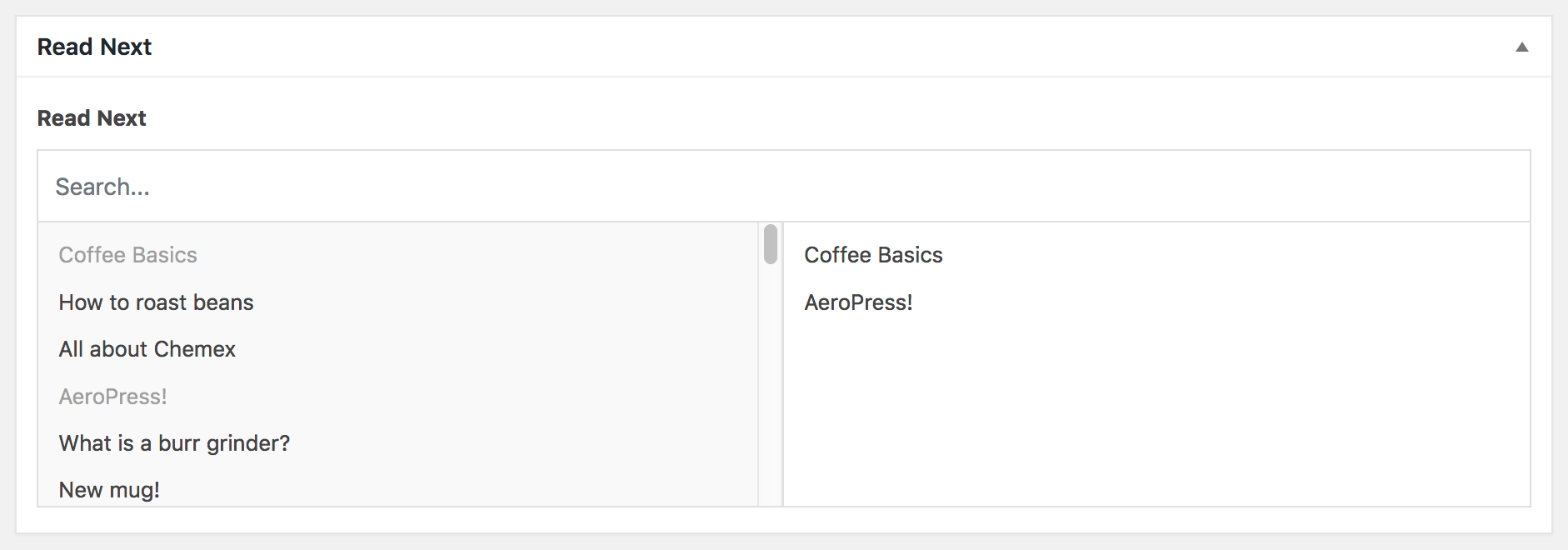
ACFのインターフェースに基づくと、選択したエントリーのすべてのエントリータイトルが検索可能になると期待するのは理にかなっていますが、実際はそうではありません!
ACFは、選択したエントリーの投稿IDのみを保存しており、SearchWPがインデックスしているのはそれです。しかし、これはサイト訪問者にとってあまり役に立ちません。
幸いなことに、SearchWPではこのデータのインデックス方法を非常に簡単に変更できます。ACFのデータレコードに表示される投稿IDを保存する代わりに、SearchWPにタイトル(または他の任意のデータ)をインデックスするように指示できます!
実際にはこのようになります:
All hooks should be added to your custom SearchWP Customizations Plugin.
| <?php | |
| /** | |
| * Tell SearchWP to index the Title from a Relationship ACF field instead of the post ID | |
| */ | |
| add_filter( 'searchwp\source\post\attributes\meta', function( $meta_value, $args ) { | |
| $acf_field_name = 'read_next'; // The ACF Relationship field name. | |
| // If we're not indexing the Read Next field, return the existing meta value. | |
| // This logic also works for sub-fields of an ACF field as well. | |
| if ( $acf_field_name !== substr( $args['meta_key'], strlen( $args['meta_key'] ) - strlen( $acf_field_name ) ) ) { | |
| return $meta_value; | |
| } | |
| // We're going to store all of our Titles together as one string for SearchWP to index. | |
| $content_to_index = ''; | |
| if ( is_array( $meta_value ) && ! empty( $meta_value ) ) { | |
| foreach ( $meta_value[0] as $acf_relationship_item ) { | |
| if ( is_numeric( $acf_relationship_item ) ) { | |
| // ACF stores only the post ID but we want the Title. | |
| $content_to_index .= ' ' . get_the_title( absint( $acf_relationship_item ) ); | |
| // If you want to index anything else, you can append it to $content_to_index. | |
| } | |
| } | |
| } | |
| // Return the string of content we want to index instead of the data stored by ACF. | |
| return $content_to_index; | |
| }, 20, 2 ); |
インデックスが再構築されるとき、SearchWPの設定画面の「エンジン」タブにある「インデックスの再構築」ボタンを使用してインデックスを再構築すると、SearchWPのインデクサーはACFフィールドをインデックスする際に上記のフックを実行します。ACFがデータを保存した投稿IDをインデックスする代わりに、各エントリーのIDをタイトルに置き換えます。
フックを調整して、タイトルだけでなく、好きなデータをインデックスさせることができます!
別の例として、ACFセレクトフィールドに対してSearchWPが何をインデックスするかをカスタマイズすることが挙げられます。デフォルトでは、ACFはセレクトフィールドのvalueのみを保存/取得しますが、訪問者がフィールドのlabelでも検索できるようにしたい場合があります。同じフックを使用して、まさにそれを実行できます:
| <?php | |
| // Tell SearchWP to index both value and label from ACF Select field. | |
| add_filter( 'searchwp\source\post\attributes\meta', function( $meta_value, $args ) { | |
| $acf_field_name = 'state'; // ACF Select field name. | |
| if ( $acf_field_name !== substr( $args['meta_key'], strlen( $args['meta_key'] ) - strlen( $acf_field_name ) ) ) { | |
| return $meta_value; | |
| } | |
| if ( ! is_array( $meta_value ) ) { | |
| $meta_value = [ $meta_value ]; | |
| } | |
| $acf_field_object = get_field_object( $acf_field_name, $args['post_id'] ); | |
| // Append the Select label to the Select value. | |
| if ( isset( $acf_field_object['choices'] ) ) { | |
| foreach ( $meta_value as $key => $val ) { | |
| if ( isset( $acf_field_object['choices'][ $val ] ) ) { | |
| $meta_value[ $key ] .= ' ' . (string) $acf_field_object['choices'][ $val ]; | |
| } | |
| } | |
| } | |
| return $meta_value; | |
| }, 20, 2 ); |
