

WooCommerce SKU(およびバリエーションSKU)を検索する
SearchWPのいくつかのフックを使用すると、製品SKU(バリエーションSKUを含む)を簡単にSearchWP検索に取り込むことができます。
ここでは、SearchWPがインデックス内の各エントリと並行して「追加」データを吸収する機能を利用します。WooCommerce製品と製品バリエーションは、それぞれカスタム投稿タイプです。製品バリエーションは基本的に親製品の子であるため、すべての製品バリエーションSKUを親SKUと並行してインデックスに登録するためのスニペットを使用します。
すべてのフックはカスタムのSearchWP カスタマイズプラグインに追加する必要があります。
| <?php | |
| // Add WooCommerce Product (and Variation) SKUs to SearchWP. | |
| // @link https://searchwp.com/documentation/knowledge-base/search-woocommerce-skus-and-variation-skus/ | |
| add_filter( 'searchwp\entry\data', function( $data, \SearchWP\Entry $entry ) { | |
| // If this is not a Product, there's nothing to do. | |
| if ( 'product' !== get_post_type( $entry->get_id() ) ) { | |
| return $data; | |
| } | |
| $my_extra_meta_key = 'searchwp_skus'; | |
| // Retrieve this Product SKU. | |
| $data['meta'][ $my_extra_meta_key ] = [ | |
| get_post_meta( $entry->get_id(), '_sku', true ) | |
| ]; | |
| // Retrieve all Variations. | |
| $product_variations = get_posts( [ | |
| 'post_type' => 'product_variation', | |
| 'posts_per_page' => -1, | |
| 'fields' => 'ids', | |
| 'post_parent' => $entry->get_id(), | |
| ] ); | |
| if ( empty( $product_variations ) ) { | |
| return $data; | |
| } | |
| // Append all Product Variation SKUs. | |
| foreach ( $product_variations as $product_variation ) { | |
| $sku = get_post_meta( $product_variation, '_sku', true ); | |
| $data['meta'][ $my_extra_meta_key ][] = $sku; | |
| } | |
| return $data; | |
| }, 20, 2 ); | |
| // Add our Extra Meta entry to SearchWP's UI. | |
| // @link https://searchwp.com/documentation/knowledge-base/search-woocommerce-skus-and-variation-skus/ | |
| add_filter( 'searchwp\source\attribute\options', function( $keys, $args ) { | |
| if ( $args['attribute'] !== 'meta' ) { | |
| return $keys; | |
| } | |
| // This key is the same as the one used in the searchwp\entry\data hook above, they must be the same. | |
| $my_extra_meta_key = 'searchwp_skus'; | |
| $option = new \SearchWP\Option( $my_extra_meta_key, 'SearchWP WooCommerce SKUs' ); | |
| // If there's already a match, remove it because we want ours there. | |
| $keys = array_filter( $keys, function( $option ) use ( $my_extra_meta_key ) { | |
| return $my_extra_meta_key !== $option->get_value(); | |
| } ); | |
| // Add "SearchWP WooCommerce SKUs" Option | |
| $keys[] = $option; | |
| return $keys; | |
| }, 20, 2 ); |
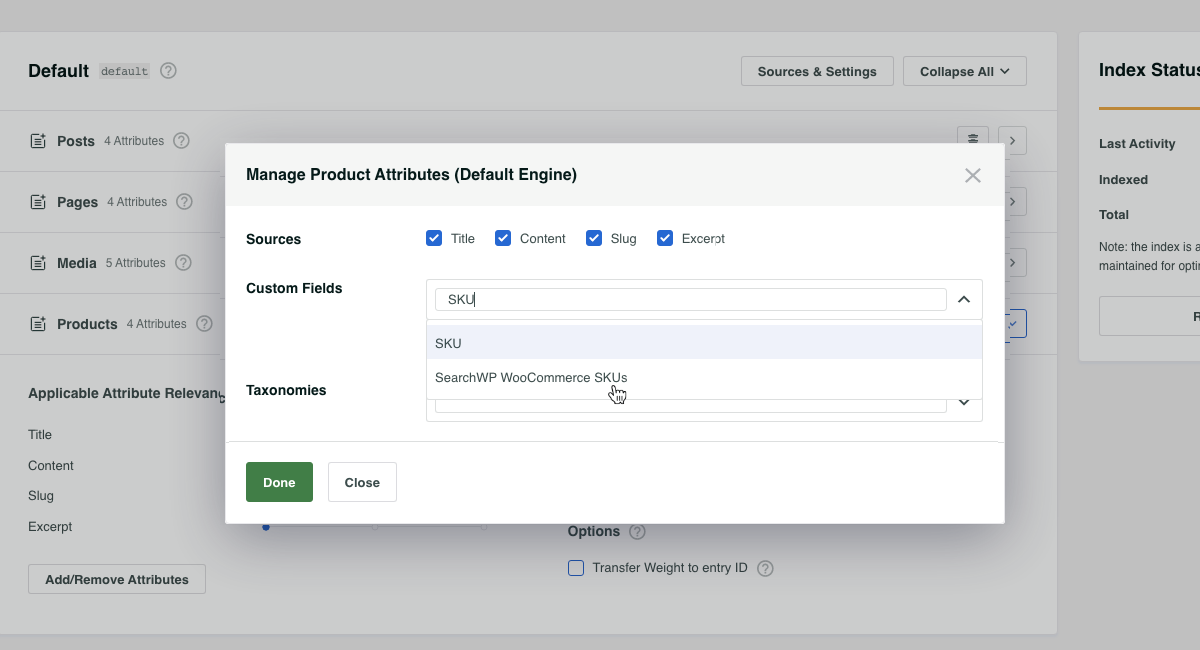
スニペットが配置されたら、SearchWP WooCommerce SKUsを製品ソースに追加して、すべての製品(およびバリエーション)SKUを検索可能にすることができます!