



WooCommerce-Produktvarianten zu Produkten hinzufügen
Inhaltsverzeichnis
WooCommerce behandelt Produktvarianten anders als Produkte; sie sind separate Post-Typen. Produkte sind öffentlich und können auf die Weise verwendet werden, wie wir es von Post-Typen gewohnt sind, aber Produktvarianten sind anders, da sie als Kinder von Produkten eingerichtet sind, aber ein anderer Post-Typ.
Es ist eine clevere Art, Dinge einzurichten, aber wir müssen ein kleines Stück benutzerdefinierten Code verwenden, um Produktvarianten durchsuchbar zu machen.
Die Einrichtung beinhaltet, SearchWP über Produktvarianten zu informieren und SearchWP Produktvarianten indizieren zu lassen, während die übergeordneten Produkte selbst indiziert werden. Wir speichern die Daten der Produktvarianten als „zusätzliche“ Metadaten für die Produkte, sodass bei der Suche nach Daten von Produktvarianten das richtige Produkt zurückgegeben wird.
All hooks should be added to your custom SearchWP Customizations Plugin.
| <?php | |
| // Add WooCommerce Product Variation data to parent Products in SearchWP. | |
| add_filter( 'searchwp\entry\data', function( $data, \SearchWP\Entry $entry ) { | |
| // If this is not a Product, there's nothing to do. | |
| if ( 'product' !== get_post_type( $entry->get_id() ) ) { | |
| return $data; | |
| } | |
| $my_extra_meta_key = 'searchwp_product_variations'; | |
| // Retrieve all Variations. | |
| $product_variations = get_posts( [ | |
| 'post_type' => 'product_variation', | |
| 'posts_per_page' => -1, | |
| 'post_parent' => $entry->get_id(), | |
| ] ); | |
| if ( empty( $product_variations ) ) { | |
| return $data; | |
| } | |
| // Customize the data indexed for each Variation. | |
| $data['meta'][ $my_extra_meta_key ] = array_filter( $product_variations, function( $variation ) { | |
| $variation->searchwp_variation_data = [ | |
| 'title' => get_the_title( $variation->ID ), | |
| 'content' => $variation->post_content, | |
| 'sku' => get_post_meta( $variation->ID, '_sku', true ), | |
| ]; | |
| return $variation; | |
| } ); | |
| return $data; | |
| }, 20, 2 ); | |
| // Add our Extra Meta entry to SearchWP's UI. | |
| add_filter( 'searchwp\source\attribute\options\special', function( $keys, $args ) { | |
| if ( $args['attribute'] !== 'meta' ) { | |
| return $keys; | |
| } | |
| // This key is the same as the one used in the searchwp\entry\data hook above, they must be the same. | |
| $my_extra_meta_key = 'searchwp_product_variations'; | |
| $option = new \SearchWP\Option( $my_extra_meta_key, 'Product Variations' ); | |
| // If there's already a match, remove it because we want ours there. | |
| $keys = array_filter( $keys, function( $option ) use ( $my_extra_meta_key ) { | |
| return $my_extra_meta_key !== $option->get_value(); | |
| } ); | |
| // Add "Product Variations" Option | |
| $keys[] = $option; | |
| return $keys; | |
| }, 20, 2 ); |
Beachten Sie, dass der Snippet Folgendes für jede Produktvariante indiziert:
- Titel
- Inhalt
- SKU
Sie können diese Liste von Attributen hinzufügen/entfernen/anpassen, um beliebige Inhalte für jede Produktvariante zu indizieren. Es hängt davon ab, was Sie durchsuchbar machen möchten.
Mit diesem Snippet können wir Produktvarianten zu den benutzerdefinierten Feldern unserer Engine hinzufügen:
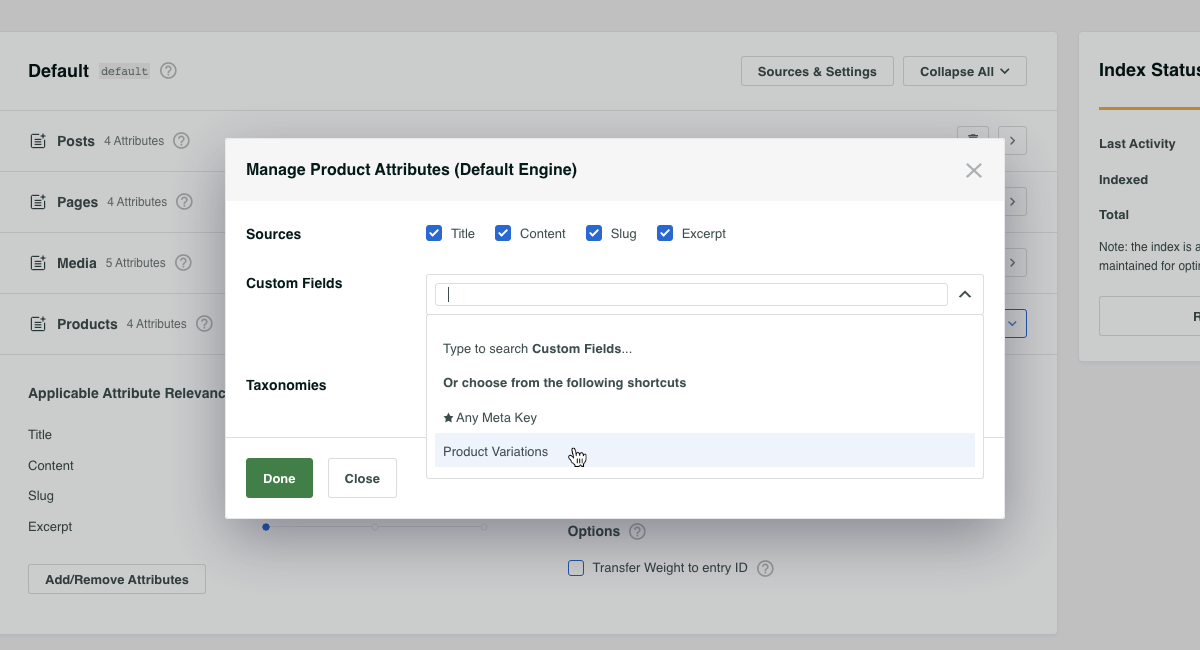
Sobald Sie Ihre Engines speichern, wird SearchWP Sie darüber informieren, dass der Index aufgrund dieser Änderung neu erstellt werden muss. Der Index kann über die Schaltfläche „Index neu erstellen“ auf der Registerkarte „Engines“ des Einstellungsbildschirms von SearchWP neu erstellt werden.
Während der Index neu erstellt wird, zieht SearchWP alle Produktvarianten ein, während es Produkte indiziert, wodurch alle Daten der Produktvarianten durchsuchbar werden und das übergeordnete Produkt zurückgegeben wird, wenn eine Übereinstimmung mit einer Produktvariante gefunden wird.
Automatische Permalinks für Produktvarianten
Wir können die Dinge noch weiter treiben, wenn Sie möchten. Bei der oben genannten Einrichtung führt die Suche nach Daten von Produktvarianten dazu, dass das Produkt selbst als Ergebnis zurückgegeben wird. Mit diesem Ergebnis wird ein Permalink zum übergeordneten Produkt angezeigt, was in vielen Fällen wünschenswert ist.
Es gibt Zeiten, in denen Website-Besucher sehr gut über Ihre Produkte informiert sind und möglicherweise nach spezifischen Daten von Produktvarianten suchen, die Sie SearchWP zum Indizieren beigebracht haben.
Zum Beispiel: Wenn Sie Fernseher verkaufen und ein übergeordnetes Produkt „OLED TV“ mit einer Reihe von Produktvarianten für jede Bildschirmgröße haben, z. B. 60 Zoll. Wenn ein Kunde nach 60 Zoll OLED TV sucht, wäre das Ergebnis das übergeordnete Produkt „OLED TV“.
Wäre es nicht großartig, automatisch auf die Produktvariante 60 Zoll zu verlinken, wenn das passiert? Das wäre es, und wir können genau das tun!
All hooks should be added to your custom SearchWP Customizations Plugin.
| <?php | |
| // @link https://searchwp.com/documentation/knowledge-base/add-woocommerce-product-variations-to-products/ | |
| // When using SearchWP it's necessary to disable WooCommerce's insistance on | |
| // automatically redirecting to a single search result without showing the | |
| // search results page, when that happens this hook doesn't run! | |
| // Willing to bet this can be edited to accommodate, tips are welcome! | |
| add_filter( 'woocommerce_redirect_single_search_result', '__return_false' ); | |
| add_filter( 'post_type_link', function( $permalink, $post ) { | |
| if ( ! is_search() || 'product' !== get_post_type( $post ) ) { | |
| return $permalink; | |
| } | |
| $search_query = \SearchWP\Utils::get_string_from( get_search_query() ); | |
| // If this is a search for a Variation SKU we can bail out early. | |
| $variation_from_sku = get_posts( [ | |
| 'post_type' => 'product_variation', | |
| 'posts_per_page' => 1, | |
| 'fields' => 'ids', | |
| 'meta_query' => [ [ | |
| 'key' => '_sku', | |
| 'value' => $search_query, | |
| ], ] | |
| ] ); | |
| // Make sure (if there is one) the Variation is for the parent Product. | |
| if ( ! empty( $variation_from_sku ) ) { | |
| // This is a Variation SKU. | |
| $variation_id = absint( $variation_from_sku[0] ); | |
| $variation_obj = new WC_Product_Variation( $variation_id ); | |
| $attributes = $variation_obj->get_variation_attributes(); | |
| if ( empty( $attributes ) ) { | |
| return $permalink; | |
| } | |
| return add_query_arg( $attributes, $permalink ); | |
| } | |
| // Determine if this Product has any Variations. | |
| $product_variations = get_posts( [ | |
| 'post_type' => 'product_variation', | |
| 'posts_per_page' => -1, | |
| 'fields' => 'ids', | |
| 'post_parent' => $post->ID, | |
| ] ); | |
| if ( empty( $product_variations ) || ! class_exists( 'WC_Product_Variation' ) ) { | |
| return $permalink; | |
| } | |
| // Check to see if any search terms match any Variation Attributes. | |
| foreach ( $product_variations as $variation_id ) { | |
| $variation_obj = new \WC_Product_Variation( $variation_id ); | |
| $attributes = $variation_obj->get_variation_attributes(); | |
| if ( empty( $attributes ) ) { | |
| continue; | |
| } | |
| $search_query = \SearchWP\Utils::clean_string( $search_query ); | |
| foreach ( $attributes as $attribute_tax => $attribute_value ) { | |
| foreach ( explode( ' ', $attribute_value ) as $value ) { | |
| $value = \SearchWP\Utils::clean_string( \SearchWP\Utils::get_string_from( $value ) ); | |
| if ( false !== strpos( $search_query, $value ) ) { | |
| $permalink = add_query_arg( [ $attribute_tax => urlencode( $attribute_value ) ], $permalink ); | |
| continue; | |
| } | |
| } | |
| } | |
| } | |
| return $permalink; | |
| }, 99, 2 ); |
Mit diesem Snippet prüfen wir, ob Produktvariantenattribute mit der Suchzeichenfolge übereinstimmen, und wenn wir einen Treffer erzielen, passen wir den Permalink automatisch an, um diese Variantenattribut zu berücksichtigen.
