
WooCommerce-SKUs (und Variant-SKUs) durchsuchen
Mit ein paar Hooks von SearchWP können Sie Ihre Produkt-SKUs (einschließlich Varianten-SKUs) problemlos in SearchWP-Suchen integrieren.
Wir werden die Fähigkeit von SearchWP nutzen, 'zusätzliche' Daten neben jedem Eintrag in seinem Index aufzunehmen. WooCommerce-Produkte und Produktvarianten sind jeweils ein benutzerdefinierter Beitragstyp. Produktvarianten sind im Wesentlichen Kinder ihres übergeordneten Produkts, daher werden wir einen Snippet verwenden, um alle Produktvarianten-SKUs neben der übergeordneten SKU zu indizieren:
All hooks should be added to your custom SearchWP Customizations Plugin.
| <?php | |
| // Add WooCommerce Product (and Variation) SKUs to SearchWP. | |
| // @link https://searchwp.com/documentation/knowledge-base/search-woocommerce-skus-and-variation-skus/ | |
| add_filter( 'searchwp\entry\data', function( $data, \SearchWP\Entry $entry ) { | |
| // If this is not a Product, there's nothing to do. | |
| if ( 'product' !== get_post_type( $entry->get_id() ) ) { | |
| return $data; | |
| } | |
| $my_extra_meta_key = 'searchwp_skus'; | |
| // Retrieve this Product SKU. | |
| $data['meta'][ $my_extra_meta_key ] = [ | |
| get_post_meta( $entry->get_id(), '_sku', true ) | |
| ]; | |
| // Retrieve all Variations. | |
| $product_variations = get_posts( [ | |
| 'post_type' => 'product_variation', | |
| 'posts_per_page' => -1, | |
| 'fields' => 'ids', | |
| 'post_parent' => $entry->get_id(), | |
| ] ); | |
| if ( empty( $product_variations ) ) { | |
| return $data; | |
| } | |
| // Append all Product Variation SKUs. | |
| foreach ( $product_variations as $product_variation ) { | |
| $sku = get_post_meta( $product_variation, '_sku', true ); | |
| $data['meta'][ $my_extra_meta_key ][] = $sku; | |
| } | |
| return $data; | |
| }, 20, 2 ); | |
| // Add our Extra Meta entry to SearchWP's UI. | |
| // @link https://searchwp.com/documentation/knowledge-base/search-woocommerce-skus-and-variation-skus/ | |
| add_filter( 'searchwp\source\attribute\options', function( $keys, $args ) { | |
| if ( $args['attribute'] !== 'meta' ) { | |
| return $keys; | |
| } | |
| // This key is the same as the one used in the searchwp\entry\data hook above, they must be the same. | |
| $my_extra_meta_key = 'searchwp_skus'; | |
| $option = new \SearchWP\Option( $my_extra_meta_key, 'SearchWP WooCommerce SKUs' ); | |
| // If there's already a match, remove it because we want ours there. | |
| $keys = array_filter( $keys, function( $option ) use ( $my_extra_meta_key ) { | |
| return $my_extra_meta_key !== $option->get_value(); | |
| } ); | |
| // Add "SearchWP WooCommerce SKUs" Option | |
| $keys[] = $option; | |
| return $keys; | |
| }, 20, 2 ); |
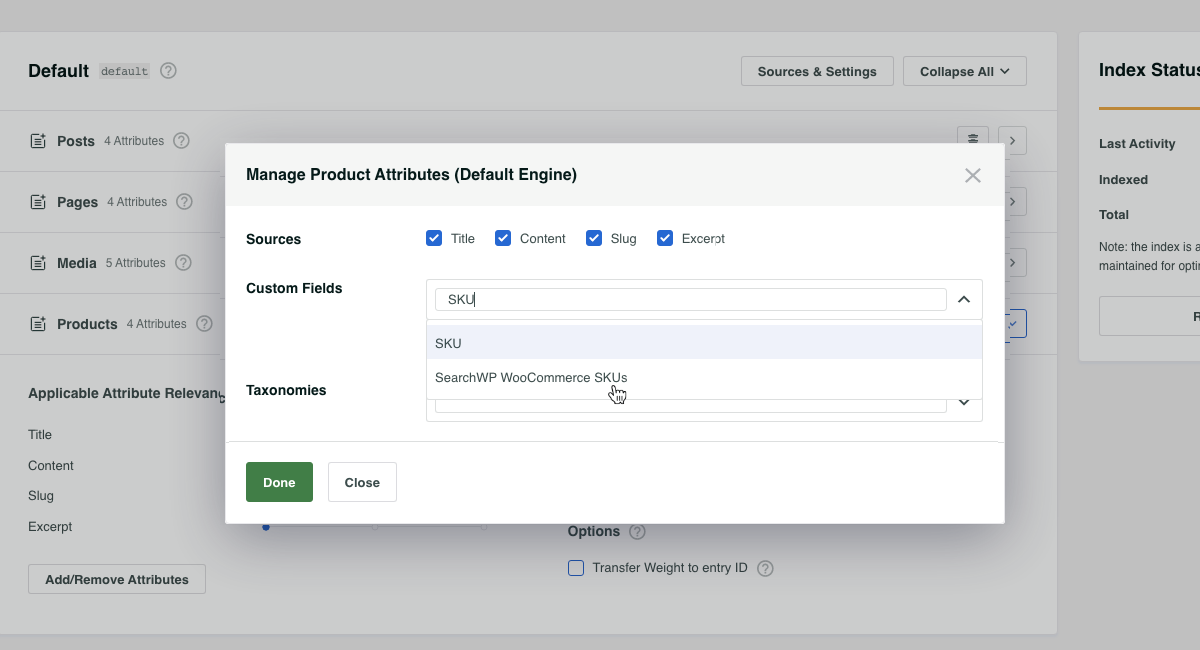
Mit dem Snippet an Ort und Stelle können wir nun SearchWP WooCommerce SKUs zu unserer Produktquelle hinzufügen, wodurch alle Produkt- (und Varianten-) SKUs durchsuchbar werden!