



WooCommerceの商品バリエーションを商品に追加する
WooCommerceでは、製品バリエーションを製品とは異なる方法で扱います。それらは別個の投稿タイプです。製品は公開されており、投稿タイプを扱うのと同じように利用できますが、製品バリエーションは、製品の子として設定されるものの、異なる投稿タイプであるという点で異なります。
これは設定の優れた方法ですが、製品バリエーションを検索可能にするには、少量のカスタムコードを使用する必要があります。
設定には、SearchWPに製品バリエーションについて教え、SearchWPが親製品自体をインデックスする際に製品バリエーションをインデックスさせる作業が含まれます。製品バリエーションデータを製品の「追加」メタデータとして保存するため、製品バリエーションデータを検索すると、適切な製品が返されます。
すべてのフックはカスタムのSearchWP カスタマイズプラグインに追加する必要があります。
| <?php | |
| // Add WooCommerce Product Variation data to parent Products in SearchWP. | |
| add_filter( 'searchwp\entry\data', function( $data, \SearchWP\Entry $entry ) { | |
| // If this is not a Product, there's nothing to do. | |
| if ( 'product' !== get_post_type( $entry->get_id() ) ) { | |
| return $data; | |
| } | |
| $my_extra_meta_key = 'searchwp_product_variations'; | |
| // Retrieve all Variations. | |
| $product_variations = get_posts( [ | |
| 'post_type' => 'product_variation', | |
| 'posts_per_page' => -1, | |
| 'post_parent' => $entry->get_id(), | |
| ] ); | |
| if ( empty( $product_variations ) ) { | |
| return $data; | |
| } | |
| // Customize the data indexed for each Variation. | |
| $data['meta'][ $my_extra_meta_key ] = array_filter( $product_variations, function( $variation ) { | |
| $variation->searchwp_variation_data = [ | |
| 'title' => get_the_title( $variation->ID ), | |
| 'content' => $variation->post_content, | |
| 'sku' => get_post_meta( $variation->ID, '_sku', true ), | |
| ]; | |
| return $variation; | |
| } ); | |
| return $data; | |
| }, 20, 2 ); | |
| // Add our Extra Meta entry to SearchWP's UI. | |
| add_filter( 'searchwp\source\attribute\options\special', function( $keys, $args ) { | |
| if ( $args['attribute'] !== 'meta' ) { | |
| return $keys; | |
| } | |
| // This key is the same as the one used in the searchwp\entry\data hook above, they must be the same. | |
| $my_extra_meta_key = 'searchwp_product_variations'; | |
| $option = new \SearchWP\Option( $my_extra_meta_key, 'Product Variations' ); | |
| // If there's already a match, remove it because we want ours there. | |
| $keys = array_filter( $keys, function( $option ) use ( $my_extra_meta_key ) { | |
| return $my_extra_meta_key !== $option->get_value(); | |
| } ); | |
| // Add "Product Variations" Option | |
| $keys[] = $option; | |
| return $keys; | |
| }, 20, 2 ); |
スニペットは、各製品バリエーションに対して次のものをインデックスすることに注意してください。
- タイトル
- コンテンツ
- SKU
製品バリエーションごとにインデックスしたいコンテンツは、この属性リストを追加/削除/カスタマイズできます。これは、検索可能にしたいものによって異なります。
スニペットを配置したら、エンジンのカスタムフィールドに「製品バリエーション」を追加できます。
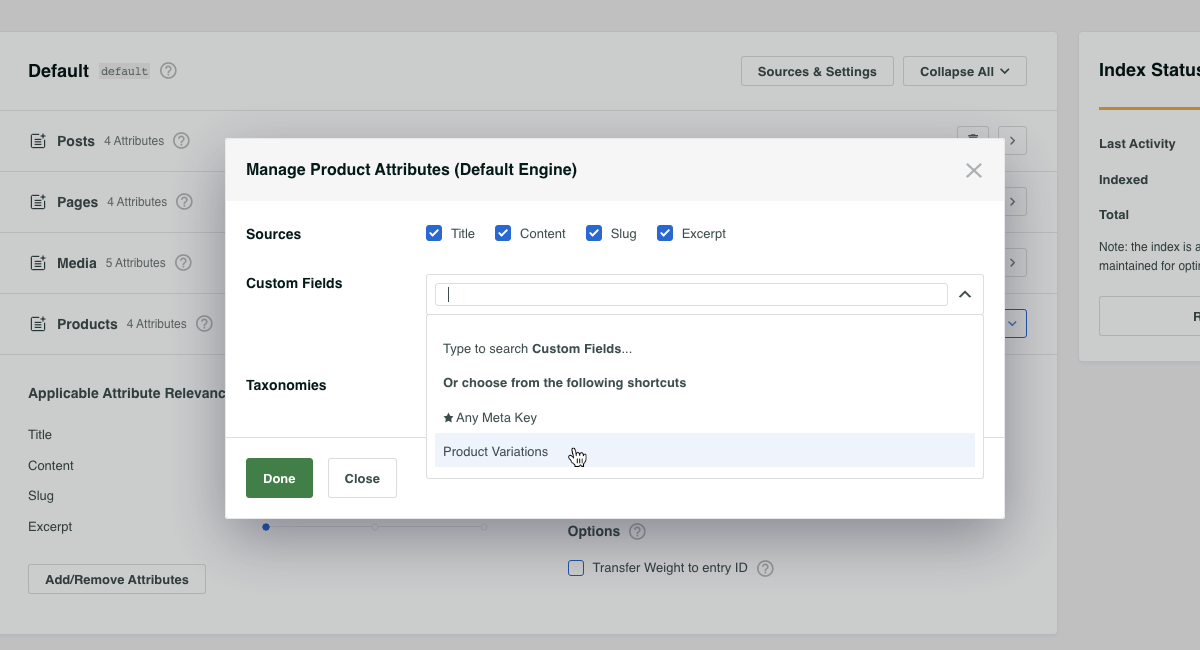
エンジンを保存すると、この変更によりインデックスの再構築が必要になることがSearchWPから通知されます。インデックスは、SearchWP設定画面のエンジンのタブにある「インデックスの再構築」ボタンを使用して再構築できます。
インデックスが再構築されると、SearchWPは製品をインデックスする際にすべての製品バリエーションを取得し、すべての製品バリエーションデータを検索可能にし、製品バリエーションの照合が見つかった場合に親製品を返します。
自動製品バリエーションパーマリンク
必要に応じて、さらに一歩進めることができます。上記のセットアップでは、製品バリエーションデータを検索すると、製品自体が結果として返されます。その結果には親製品へのパーマリンクが含まれますが、これは多くの場合望ましいことです。
サイト訪問者が製品について非常に詳しく、SearchWPがインデックスするように教えた特定の製品バリエーションデータを検索している場合があります。
たとえば、テレビを販売しており、親製品「OLED TV」があり、画面サイズごとに多数の製品バリエーション(例:「60インチ」)があるとします。顧客が「60インチ OLED TV」を検索した場合、結果はOLED TVの親製品になります。
その場合、「60インチ」製品バリエーションに自動的にリンクされると素晴らしいと思いませんか?それは素晴らしいことです。そして、まさにそれを実行できます!
すべてのフックはカスタムのSearchWP カスタマイズプラグインに追加する必要があります。
| <?php | |
| // @link https://searchwp.com/documentation/knowledge-base/add-woocommerce-product-variations-to-products/ | |
| // When using SearchWP it's necessary to disable WooCommerce's insistance on | |
| // automatically redirecting to a single search result without showing the | |
| // search results page, when that happens this hook doesn't run! | |
| // Willing to bet this can be edited to accommodate, tips are welcome! | |
| add_filter( 'woocommerce_redirect_single_search_result', '__return_false' ); | |
| add_filter( 'post_type_link', function( $permalink, $post ) { | |
| if ( ! is_search() || 'product' !== get_post_type( $post ) ) { | |
| return $permalink; | |
| } | |
| $search_query = \SearchWP\Utils::get_string_from( get_search_query() ); | |
| // If this is a search for a Variation SKU we can bail out early. | |
| $variation_from_sku = get_posts( [ | |
| 'post_type' => 'product_variation', | |
| 'posts_per_page' => 1, | |
| 'fields' => 'ids', | |
| 'meta_query' => [ [ | |
| 'key' => '_sku', | |
| 'value' => $search_query, | |
| ], ] | |
| ] ); | |
| // Make sure (if there is one) the Variation is for the parent Product. | |
| if ( ! empty( $variation_from_sku ) ) { | |
| // This is a Variation SKU. | |
| $variation_id = absint( $variation_from_sku[0] ); | |
| $variation_obj = new WC_Product_Variation( $variation_id ); | |
| $attributes = $variation_obj->get_variation_attributes(); | |
| if ( empty( $attributes ) ) { | |
| return $permalink; | |
| } | |
| return add_query_arg( $attributes, $permalink ); | |
| } | |
| // Determine if this Product has any Variations. | |
| $product_variations = get_posts( [ | |
| 'post_type' => 'product_variation', | |
| 'posts_per_page' => -1, | |
| 'fields' => 'ids', | |
| 'post_parent' => $post->ID, | |
| ] ); | |
| if ( empty( $product_variations ) || ! class_exists( 'WC_Product_Variation' ) ) { | |
| return $permalink; | |
| } | |
| // Check to see if any search terms match any Variation Attributes. | |
| foreach ( $product_variations as $variation_id ) { | |
| $variation_obj = new \WC_Product_Variation( $variation_id ); | |
| $attributes = $variation_obj->get_variation_attributes(); | |
| if ( empty( $attributes ) ) { | |
| continue; | |
| } | |
| $search_query = \SearchWP\Utils::clean_string( $search_query ); | |
| foreach ( $attributes as $attribute_tax => $attribute_value ) { | |
| foreach ( explode( ' ', $attribute_value ) as $value ) { | |
| $value = \SearchWP\Utils::clean_string( \SearchWP\Utils::get_string_from( $value ) ); | |
| if ( false !== strpos( $search_query, $value ) ) { | |
| $permalink = add_query_arg( [ $attribute_tax => urlencode( $attribute_value ) ], $permalink ); | |
| continue; | |
| } | |
| } | |
| } | |
| } | |
| return $permalink; | |
| }, 99, 2 ); |
このスニペットを配置すると、検索文字列に一致する製品バリエーション属性を確認し、ヒットがあった場合は、そのバリエーションを自動的に考慮するようにパーマリンクを調整します。
