
Pesquisar SKUs WooCommerce (e SKUs de Variação)
Usando alguns hooks do SearchWP, você pode facilmente incorporar seus SKUs de Produto (incluindo SKUs de Variação) nas pesquisas do SearchWP.
Vamos aproveitar a capacidade do SearchWP de absorver dados 'extras' junto com cada entrada em seu índice. Produtos WooCommerce e Variações de Produto são cada um um tipo de postagem personalizado. Variações de Produto são essencialmente filhas de seu Produto pai, então usaremos um snippet para ter todos os SKUs de Variação de Produto indexados junto com o SKU pai:
Todos os hooks devem ser adicionados a seu plugin personalizado SearchWP Customizations Plugin.
| <?php | |
| // Add WooCommerce Product (and Variation) SKUs to SearchWP. | |
| // @link https://searchwp.com/documentation/knowledge-base/search-woocommerce-skus-and-variation-skus/ | |
| add_filter( 'searchwp\entry\data', function( $data, \SearchWP\Entry $entry ) { | |
| // If this is not a Product, there's nothing to do. | |
| if ( 'product' !== get_post_type( $entry->get_id() ) ) { | |
| return $data; | |
| } | |
| $my_extra_meta_key = 'searchwp_skus'; | |
| // Retrieve this Product SKU. | |
| $data['meta'][ $my_extra_meta_key ] = [ | |
| get_post_meta( $entry->get_id(), '_sku', true ) | |
| ]; | |
| // Retrieve all Variations. | |
| $product_variations = get_posts( [ | |
| 'post_type' => 'product_variation', | |
| 'posts_per_page' => -1, | |
| 'fields' => 'ids', | |
| 'post_parent' => $entry->get_id(), | |
| ] ); | |
| if ( empty( $product_variations ) ) { | |
| return $data; | |
| } | |
| // Append all Product Variation SKUs. | |
| foreach ( $product_variations as $product_variation ) { | |
| $sku = get_post_meta( $product_variation, '_sku', true ); | |
| $data['meta'][ $my_extra_meta_key ][] = $sku; | |
| } | |
| return $data; | |
| }, 20, 2 ); | |
| // Add our Extra Meta entry to SearchWP's UI. | |
| // @link https://searchwp.com/documentation/knowledge-base/search-woocommerce-skus-and-variation-skus/ | |
| add_filter( 'searchwp\source\attribute\options', function( $keys, $args ) { | |
| if ( $args['attribute'] !== 'meta' ) { | |
| return $keys; | |
| } | |
| // This key is the same as the one used in the searchwp\entry\data hook above, they must be the same. | |
| $my_extra_meta_key = 'searchwp_skus'; | |
| $option = new \SearchWP\Option( $my_extra_meta_key, 'SearchWP WooCommerce SKUs' ); | |
| // If there's already a match, remove it because we want ours there. | |
| $keys = array_filter( $keys, function( $option ) use ( $my_extra_meta_key ) { | |
| return $my_extra_meta_key !== $option->get_value(); | |
| } ); | |
| // Add "SearchWP WooCommerce SKUs" Option | |
| $keys[] = $option; | |
| return $keys; | |
| }, 20, 2 ); |
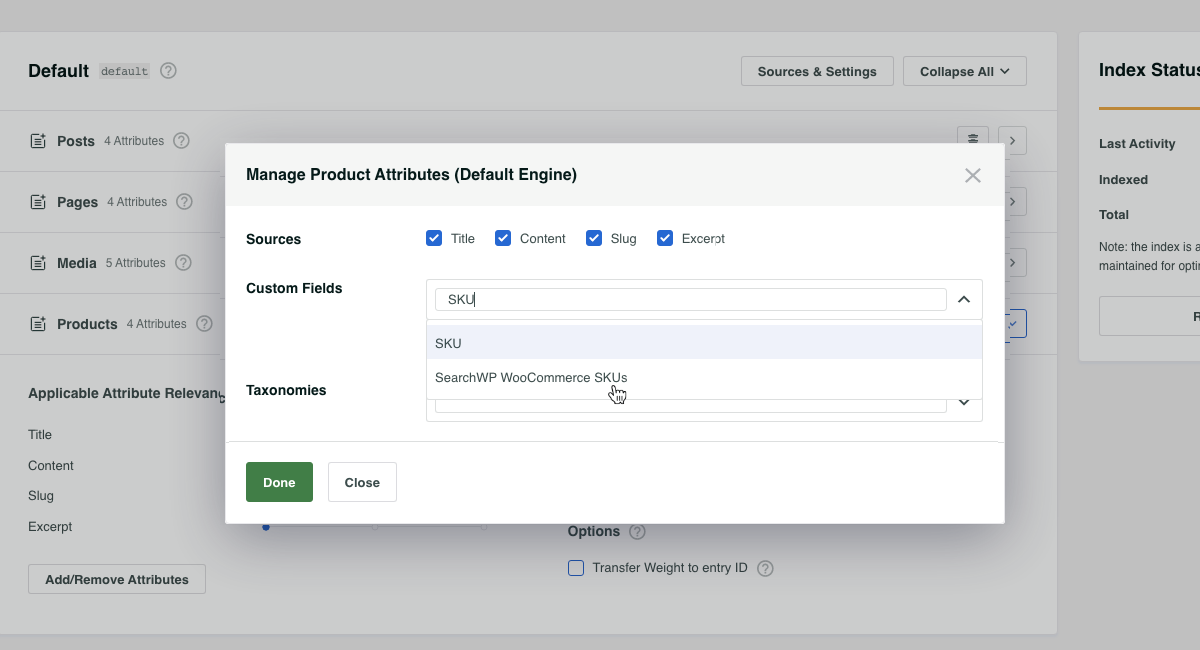
Com o snippet implementado, agora podemos adicionar SKUs de Produtos WooCommerce do SearchWP à nossa Fonte de Produtos, tornando todos os SKUs de Produto (e Variação) pesquisáveis!