



WP Document Revisions Integration
This Extension requires a Pro license
Current version: 1.1.0
The WP Document Revisions plugin transforms WordPress into a document management system by introducing a structured workflow for handling files such as PDFs. Each document is stored as a custom post type (commonly document) and can have multiple revisions, where each revision is associated with an uploaded file.
In this setup, the actual searchable content typically exists inside the uploaded file rather than in the WordPress editor. This means that default WordPress search—and even basic SearchWP configurations—cannot detect or index the text contained within those files.
The SearchWP WP Document Revisions Integration solves this limitation by automatically retrieving the file from the latest document revision, extracting its contents (such as PDF text), and including that data in the SearchWP index.
How the Integration Works
When the integration is active, SearchWP enhances document search in the following ways:
- It retrieves the latest file revision associated with each document and extracts the text content from the file (where supported, such as PDFs)
- The extracted content is stored in a pseudo custom field with the key
swp_wp_document_revision - This field is then indexed and can influence search relevance just like any other custom field
As a result, users can search for terms that exist only inside the document file, not just in the post title or content.
Configuring the Integration in SearchWP
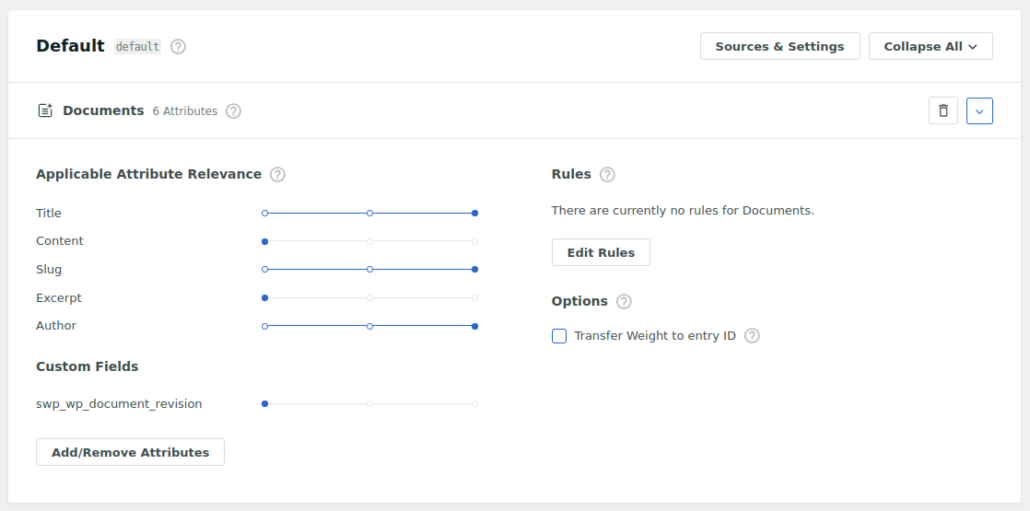
To enable this functionality in your SearchWP engine, navigate to SearchWP → Algorithm and edit your engine configuration. Ensure that the document post type is included as a source.
Within that source, add a Custom Field attribute using the key swp_wp_document_revision. In many cases, this will also appear with a label such as “WP Document Revisions” in the dropdown. Assign an appropriate weight to this field depending on how important matches inside document files should be in your search results.
After saving your engine settings, perform a full reindex so that existing documents are processed and their file contents are included in the index.
Note: The integration always uses the latest revision of a document when extracting content. If a revision does not explicitly store a valid attachment ID, the system will attempt to fall back to the most recent uploaded file associated with that document. This behavior aligns with how WP Document Revisions manages document versions internally.
Changelog
1.0.1
- [Update] Updated updater
1.0
- Initial release
