


Voice search is no longer a novelty feature reserved for smart speakers and phone assistants. It’s quickly becoming a standard way people interact with the web.
According to recent data, roughly 27% of people worldwide use voice search on their mobile devices. For WordPress site owners, that shift creates a real opportunity.
However, WordPress’s default search doesn’t support voice input at all. Out of the box, your visitors have no way to search by speaking, even if their browser fully supports it.
That’s where WordPress voice search plugins come in. The right plugin can add a microphone button to your search bar, transcribe what visitors say, and return relevant results. All without you writing a single line of code.
In this article, we researched and reviewed 5 best WordPress voice search plugins, so you can make an informed decision and choose the right option for your website.
Here’s a quick comparison before we dive in:
| # | Plugin | Best For | Price |
|---|---|---|---|
| 1. | SearchWP ? | Best overall search with voice for WordPress | From $99/year |
| 2. | FiboSearch | WooCommerce stores voice search | Free / From $59/year |
| 3. | WP Fastest Site Search | AI-powered search with voice | Free / From $299/month |
| 4. | Audible Site Search | Ultra-lightweight voice setup | Free |
| 5. | Voice Search | Simple mic button plugin | Free |
How We Tested and Reviewed Voice Search Plugins
We didn’t just read the plugin descriptions, we dug into actual user experiences. Here’s what we looked at for each plugin:
- Voice search functionality: Does it work reliably? Does it auto-submit after transcription? How does it handle different accents or background noise?
- Ease of setup: Can a non-technical user get it running in under 10 minutes? Does it require creating third-party accounts or API keys?
- Search result quality: Once voice input is transcribed, are the results actually relevant? This depends heavily on how the underlying search engine works.
- Mobile performance: Since voice search is most commonly used on mobile, we paid special attention to how each plugin behaves on phones and tablets.
- Compatibility: Does it work with popular themes and other search plugins? Does it conflict with common page builders?
- Pricing and value: Is the free version genuinely useful, or is it just a teaser? Are the paid plans fairly priced for what they offer?
We also pulled in real user reviews from multiple sources to give you an honest picture of where each plugin shines and where it falls short.
That said, let’s look at some of the best voice search plugins for WordPress.
1. SearchWP — Best Overall Voice Search Plugin

SearchWP is the most powerful WordPress search plugin on the market, trusted by over 50,000 website owners.
While it isn’t a dedicated voice-only plugin, it’s the most complete solution on this list. It supercharges your site’s search engine, includes additional details in the search process, and helps you make PDFs, documents, media files, categories, tags, and other sources searchable.
Think of it this way: voice search is only as good as the search engine behind it. A voice plugin that transcribes speech perfectly is useless if the underlying WordPress search returns irrelevant or incomplete results. SearchWP solves the search engine problem completely.
That said, we found SearchWP’s voice search features really easy to use and set up. You can quickly enable the option from the search form settings.
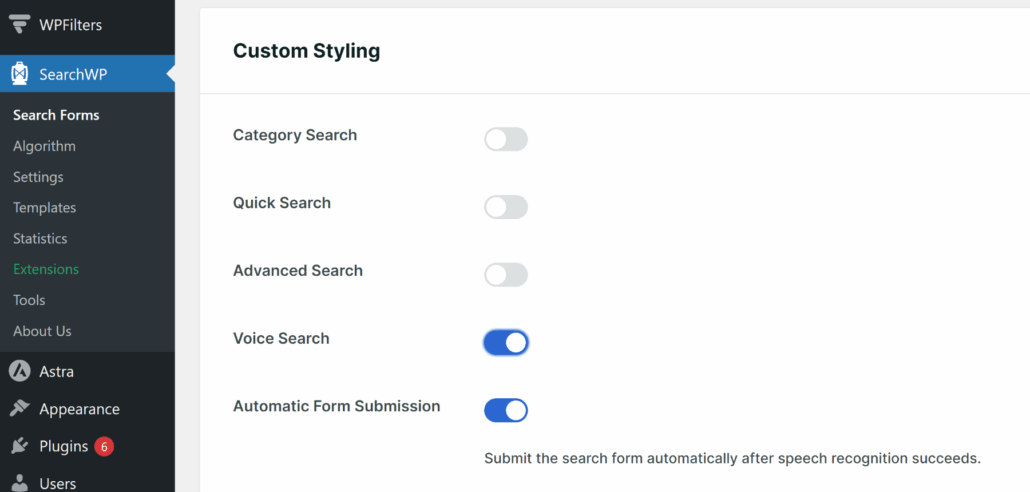
What is more interesting is that it also offers an Automatic Form Submission option. What this does is that it automatically submits the search once the speech recognition is complete.
Other than that, the voice search works with browsers that support Web Speech API, which includes Google Chrome, Microsoft Edge, and Safari.
Key Features:
- Customizable search algorithm: Use a visual interface to control what gets indexed and how results are ranked.
- Live Ajax search: Instant, as-you-type search results without a full page reload.
- WooCommerce integration: Search products by name, description, attributes, SKUs, and customer reviews.
- Search analytics (Metrics): See exactly what visitors are searching for, what returns no results, and how search behavior evolves.
- Keyword stemming: Users don’t need to type exact keywords. SearchWP understands variations, partial matches, and related terms.
- PDF and document search: Index and search the content inside uploaded PDFs and Office documents.
- Multiple search engines: Create separate search configurations for different parts of your site.
- Priority and custom result ordering: Manually pin or promote specific results for key search queries.
Pros:
- The most powerful and flexible search engine on WordPress
- Indexes virtually any content type, including PDFs, custom fields, and WooCommerce products
- Keyword stemming and fuzzy matching deliver highly relevant results
- Search analytics reveal what visitors actually want to find
- Trusted by 50,000+ sites with an excellent support reputation
- Works seamlessly with voice input plugins for a complete solution
Cons:
- No free version available
Verdict: SearchWP is the best choice for anyone who wants their voice search actually to work well. If you care about search quality and want a future-proof setup that supports voice, live search, WooCommerce, and analytics, SearchWP is the clear winner.
Pricing: SearchWP prices start with the Standard plan for $99/year (1 site). Plus, all plans come with a 14-day money-back guarantee.
2. FiboSearch — Best Voice Search Plugin for WooCommerce Stores

FiboSearch is a popular WooCommerce-specific search plugin. Its voice search feature is available on the Pro plan and lets shoppers speak their product queries directly into the search bar.
FiboSearch is purpose-built for e-commerce, and it shows. Its core strength is the instant, as-you-type autocomplete experience that displays product images, prices, SKUs, and even an “Add to Cart” button in the live search results dropdown.
Key Features:
- Voice search (Pro): A built-in microphone button lets shoppers search by speaking. Works with both the default Solaris and the alternative Pirx search layouts.
- Ultra-fast custom search engine: FiboSearch builds its own optimized inverted index, delivering results up to 10x faster than standard WooCommerce search, even on stores with 50,000+ products.
- SHORTINIT mode: Loads only the essential WordPress files during a search, preventing themes and other plugins from slowing down results.
- Details panel: On hover, an expanded panel shows product image, price, SKU, description, and an Add to Cart button — no need to leave the page.
- Searches by title, description, SKU, attributes, categories, and tags: Comprehensive product data coverage out of the box.
- Mobile-first design: Dedicated mobile search mode with optimized UX for small screens.
- Parallel indexing: Re-indexing happens in the background, so your search never goes down while updates run.
- One-click theme integration: Pre-built integrations with 54+ popular themes, including Astra, Divi, Blocksy, and Flatsome.
Pros:
- Extremely fast, purpose-built search engine for WooCommerce
- Voice search built into the Pro plugin (no third-party pairing needed)
- Beautiful live search results with product images, price, and Add to Cart
- Works on stores with 50,000+ products without slowing down
- 54+ one-click theme integrations
Cons:
- Voice search is a Pro feature, not available on the free plan
- Designed exclusively for WooCommerce & not suitable for non-store sites
Verdict: If you run a WooCommerce store and want voice search built directly into a polished, fast product search experience, FiboSearch Pro is the best dedicated option available.
Pricing: FiboSearch voice search is available on paid plans starting at $59/year.
3. WP Fastest Site Search — Best for AI-Powered Search with Voice

WP Fastest Site Search is the WordPress plugin for ExpertRec, a cloud-based AI search platform.
It replaces WordPress’s default search with a fully hosted, cloud-powered search engine that includes voice search, autocomplete, typo correction, PDF search, image search, and advanced faceted filters.
Unlike the other plugins on this list that we tested, WP Fastest Site Search is a hosted SaaS solution. It works by crawling your site, building a search index on ExpertRec’s servers, and serving results through a customizable search widget embedded on your site.
On the downside, WP Fastest Site Search is an expensive solution that might be suitable for large businesses handling thousands of products or pieces of content on their site.
Key Features:
- Voice search: A microphone button in the search widget enables hands-free queries. Currently supported in the Chrome browser.
- AI-powered relevance: A self-learning search algorithm continuously improves result quality based on user behavior.
- Autocomplete with typo correction: Fast typeahead suggestions that work even when users misspell their queries.
- PDF and image search: Index and return results from uploaded documents and media files.
- Advanced filters and facets: Build category, tag, price, or custom attribute filters without coding.
- Full UI customization: Change colors, layout, fonts, and display options to match your site’s design.
- WooCommerce compatible: Searches products by metafields, attributes, SKU, and custom product data.
- AI features: Includes a ChatGPT-based page summary, agentic search, and RAG-based direct question-answering mode.
- Analytics: Track search usage and identify what visitors are looking for.
Pros:
- Genuinely fast, search runs on external servers, not your hosting
- Voice search is included across paid plans
- AI-powered relevance that improves over time
- Extensive customization options with no coding required
- Works across all devices and screen sizes
Cons:
- An expensive solution to run
- Ongoing monthly cost — not a one-time purchase
- Voice search is limited to the Chrome browser
- Relies on an external service (site search depends on ExpertRec’s uptime)
- Some premium features require contacting support rather than self-serve configuration
Verdict: WP Fastest Site Search is a strong choice if you want a cloud-powered, AI-driven search engine with voice capability. It’s especially worth considering for larger content sites or stores where search performance at scale is a priority.
Pricing: WP Fastest Site Search base plugin is free. But it requires ExpertRec to work, and prices start from $299 per month (50k search requests).
4. Audible Site Search — Best Lightweight, No-Fuss Voice Search Plugin

Audible Site Search is the most stripped-down option on this list. After testing the plugin, we found that it is a small, focused plugin that does exactly one thing: adds voice-powered search input and real-time AJAX search suggestions to your WordPress site.
There’s no account to create, no dashboard to configure, no API keys, and no external service dependency.
You install it, activate it, drop a shortcode where you want the voice search bar to appear, and you’re done.
Key Features:
- Voice recognition: Uses the Web Speech API (the same browser-native API built into Chrome) to transcribe spoken queries.
- AJAX-powered live suggestions: As a query is processed, real-time search suggestions appear without a page reload.
- Shortcode placement: Use
[audisise_voice_search]to embed the voice search bar anywhere. - Lightweight and responsive: Minimal footprint and a clean, mobile-responsive design.
- Works with default WordPress search: Routes voice queries through your existing WordPress search setup — no replacement engine required.
Pros:
- Completely free with no account or API key required
- Extremely lightweight — minimal impact on page load
- Simple shortcode implementation
- Works out of the box with any WordPress theme
- No external service dependency
Cons:
- Very new plugin — limited user reviews and community track record
- Voice recognition is limited to Chrome (desktop and mobile)
- No standalone settings panel or customization options
- Search quality depends entirely on your existing WordPress search engine
- Not suitable for WooCommerce or complex search needs
Verdict: Audible Site Search is the right choice if you want to add a microphone button to your site with zero setup, zero cost, and zero complexity.
Pricing: Completely free, no paid tier
5. Voice Search — Best Simple Mic Button for Existing Search Forms

Voice Search is a solid, reliable choice for adding a simple microphone button to your existing WordPress search form.
It’s completely free, works with no configuration, and has a small but steady community of happy users.
While testing, we found that the plugin hooks into the default WordPress get_search_form() function and injects a mic button alongside the search input.
When a visitor clicks it, the browser requests microphone access, listens for speech, transcribes it, and auto-submits the search, just like it would if the user had typed and hit Enter.
Key Features:
- Microphone button injection: Automatically adds a mic icon to any search form that uses the standard WordPress
get_search_form()function. - Web Speech API: Uses the browser’s native speech recognition — no external APIs or accounts needed.
- Auto-submit on completion: After transcription, the search form submits automatically without requiring the user to tap again.
- Zero configuration: No settings panel needed. Install, activate, and it works.
Pros:
- Completely free with zero configuration required
- Auto-submits after voice transcription
- Tested and confirmed working on iOS Chrome and Android
- No external services or accounts needed
Cons:
- Limited to Chrome on desktop and mobile for full functionality
- Minor CSS conflicts are possible with certain themes
- Less actively maintained compared to commercial plugins
- Search quality depends entirely on your underlying search engine
Verdict: Voice Search is the simplest, most no-fuss way to add a microphone button to your WordPress search bar. It’s best for sites that already have solid search results but just want to add a hands-free voice input option.
Pricing: It is a free WordPress plugin to use.
Which WordPress Voice Search Plugin Is Right for You?
If you want the best possible voice search experience on WordPress, SearchWP is the answer.
It is the strongest search plugin available for WordPress, as it indexes everything on your site, delivers highly relevant results through a customizable algorithm, and works seamlessly with other tools and plugins.
You get the complete package: hands-free input and intelligent results, without compromise. For most WordPress sites, such as blogs, business sites, membership platforms, and WooCommerce stores alike, SearchWP is the one we recommend.
For more specialized needs, two plugins are worth mentioning. FiboSearch Pro is a strong choice if you run a WooCommerce store and want voice search bundled into a dedicated product search experience.
WP Fastest Site Search is worth considering if you prefer a fully hosted, cloud-powered solution and don’t want to manage indexing on your own server, with AI-driven relevance improvements built in over time. However, this is an expensive solution and is recommended for large corporations or sites that have thousands of content pieces or products.
FAQs About WordPress Voice Search Plugins
1. What is WordPress voice search?
WordPress voice search is a feature that allows visitors to search your site by speaking rather than typing. A voice search plugin adds a microphone button to your search form. When clicked, it listens to the user’s speech, transcribes it into text using the browser’s speech recognition API, and submits it as a search query.
2. Does WordPress support voice search by default?
No. WordPress’s built-in search has no voice input support. You need to install a dedicated voice search plugin, or use an advanced search plugin like SearchWP or FiboSearch that includes voice functionality.
3. Will voice search work on mobile devices?
Yes. Mobile is actually where voice search is most commonly used. Most voice search plugins rely on the browser’s Web Speech API, which is supported in Chrome on both desktop and Android. Safari on iOS also has support for the Web Speech API, so users on iPhones with Safari or Chrome can typically use voice search without issues.
4. Do voice search plugins work with WooCommerce?
It depends on the plugin. SearchWP and FiboSearch Pro have native WooCommerce voice search built in. Plugins like Voice Search and Audible Site Search will pass the transcribed query to whatever search engine is running on your site, so if WooCommerce search is enabled, it will be used.
5. Do I need coding skills to set up voice search on WordPress?
No. All five plugins reviewed here are designed for non-technical users and can be set up without writing any code.
Voice search is no longer a futuristic add-on. It’s an expected feature for sites that take user experience seriously. With over 157 million voice assistant users projected in the U.S. alone by the end of 2026, giving your visitors a way to search by speaking is a straightforward win.
The good news is that adding voice search to WordPress doesn’t have to be complicated or expensive. With SearchWP, it is easy and takes only a few minutes.
We hope this article helped you select the best voice search plugin for WordPress. You may also want to see our list of best WordPress filter plugins that actually work and our guide on how to find the most searched product on your website.
Get the SearchWP plan that caters to your needs and level up your business.