



Aggiungi le varianti di prodotto WooCommerce ai prodotti
WooCommerce tratta le Variazioni di Prodotto in modo diverso dai Prodotti; sono tipi di post separati. I Prodotti sono pubblici e possono essere utilizzati nel modo in cui siamo abituati a lavorare con i tipi di post, ma le Variazioni di Prodotto sono diverse in quanto sono impostate come figli dei Prodotti, ma di un tipo di post diverso.
È un modo ordinato per impostare le cose, ma abbiamo bisogno di usare un piccolo pezzo di codice personalizzato per rendere ricercabili le Variazioni di Prodotto.
La configurazione comporterà l'insegnamento a SearchWP riguardo alle Variazioni di Prodotto e il fatto che SearchWP indicizzi le Variazioni di Prodotto mentre indicizza i Prodotti padre stessi. Memorizzeremo i dati delle Variazioni di Prodotto come metadati 'extra' per i Prodotti, quindi quando cerchi dati di Variazioni di Prodotto verrà restituito il Prodotto corretto.
Tutti gli hook dovrebbero essere aggiunti al tuo plugin personalizzato SearchWP Customizations Plugin.
| <?php | |
| // Add WooCommerce Product Variation data to parent Products in SearchWP. | |
| add_filter( 'searchwp\entry\data', function( $data, \SearchWP\Entry $entry ) { | |
| // If this is not a Product, there's nothing to do. | |
| if ( 'product' !== get_post_type( $entry->get_id() ) ) { | |
| return $data; | |
| } | |
| $my_extra_meta_key = 'searchwp_product_variations'; | |
| // Retrieve all Variations. | |
| $product_variations = get_posts( [ | |
| 'post_type' => 'product_variation', | |
| 'posts_per_page' => -1, | |
| 'post_parent' => $entry->get_id(), | |
| ] ); | |
| if ( empty( $product_variations ) ) { | |
| return $data; | |
| } | |
| // Customize the data indexed for each Variation. | |
| $data['meta'][ $my_extra_meta_key ] = array_filter( $product_variations, function( $variation ) { | |
| $variation->searchwp_variation_data = [ | |
| 'title' => get_the_title( $variation->ID ), | |
| 'content' => $variation->post_content, | |
| 'sku' => get_post_meta( $variation->ID, '_sku', true ), | |
| ]; | |
| return $variation; | |
| } ); | |
| return $data; | |
| }, 20, 2 ); | |
| // Add our Extra Meta entry to SearchWP's UI. | |
| add_filter( 'searchwp\source\attribute\options\special', function( $keys, $args ) { | |
| if ( $args['attribute'] !== 'meta' ) { | |
| return $keys; | |
| } | |
| // This key is the same as the one used in the searchwp\entry\data hook above, they must be the same. | |
| $my_extra_meta_key = 'searchwp_product_variations'; | |
| $option = new \SearchWP\Option( $my_extra_meta_key, 'Product Variations' ); | |
| // If there's already a match, remove it because we want ours there. | |
| $keys = array_filter( $keys, function( $option ) use ( $my_extra_meta_key ) { | |
| return $my_extra_meta_key !== $option->get_value(); | |
| } ); | |
| // Add "Product Variations" Option | |
| $keys[] = $option; | |
| return $keys; | |
| }, 20, 2 ); |
Nota che lo snippet indicizza quanto segue per ogni Variazione di Prodotto:
- Titolo
- Contenuto
- SKU
Puoi aggiungere/rimuovere/personalizzare questo elenco di attributi per indicizzare qualsiasi contenuto desideri per ogni Variazione di Prodotto, dipende da cosa desideri rendere ricercabile.
Con quello snippet in atto possiamo aggiungere Variazioni di Prodotto ai Campi Personalizzati del nostro Motore:
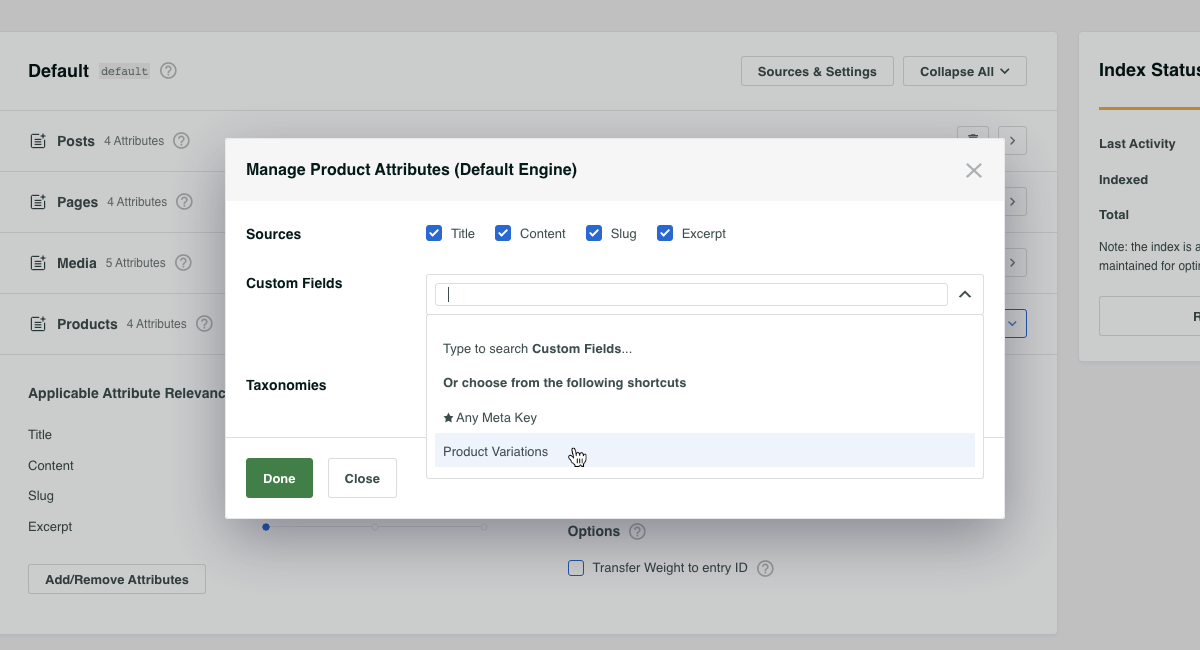
Una volta salvati i tuoi Motori, SearchWP ti farà sapere che l'indice deve essere ricostruito a causa di questa modifica. L'indice può essere ricostruito utilizzando il pulsante Ricostruisci Indice nella scheda Motori della schermata delle impostazioni di SearchWP.
Mentre l'indice si ricostruisce, SearchWP estrarrà tutte le Variazioni di Prodotto mentre indicizza i Prodotti, rendendo ricercabili tutti quei dati delle Variazioni di Prodotto e restituendo il Prodotto padre quando viene trovata una corrispondenza di Variazione di Prodotto.
Permalink Automatici per le Variazioni di Prodotto
Possiamo portare le cose un passo avanti se lo desideri. Data la configurazione sopra, la ricerca di dati di Variazioni di Prodotto restituirà il Prodotto stesso come risultato. Con quel risultato ci sarà un permalink al Prodotto padre, che in molti casi è desiderabile.
Ci sono momenti in cui i visitatori del sito conoscono bene i tuoi Prodotti e potrebbero cercare dati specifici di Variazioni di Prodotto che hai insegnato a SearchWP a indicizzare.
Ad esempio: se vendi TV e hai un Prodotto padre "OLED TV" con un numero di Variazioni di Prodotto per ogni dimensione dello schermo, ad es. 60". Se un cliente cerca 60" OLED TV il risultato sarebbe il Prodotto padre OLED TV.
Non sarebbe fantastico collegarsi automaticamente alla Variazione di Prodotto 60" quando ciò accade? Lo sarebbe, e possiamo fare esattamente questo!
Tutti gli hook dovrebbero essere aggiunti al tuo plugin personalizzato SearchWP Customizations Plugin.
| <?php | |
| // @link https://searchwp.com/documentation/knowledge-base/add-woocommerce-product-variations-to-products/ | |
| // When using SearchWP it's necessary to disable WooCommerce's insistance on | |
| // automatically redirecting to a single search result without showing the | |
| // search results page, when that happens this hook doesn't run! | |
| // Willing to bet this can be edited to accommodate, tips are welcome! | |
| add_filter( 'woocommerce_redirect_single_search_result', '__return_false' ); | |
| add_filter( 'post_type_link', function( $permalink, $post ) { | |
| if ( ! is_search() || 'product' !== get_post_type( $post ) ) { | |
| return $permalink; | |
| } | |
| $search_query = \SearchWP\Utils::get_string_from( get_search_query() ); | |
| // If this is a search for a Variation SKU we can bail out early. | |
| $variation_from_sku = get_posts( [ | |
| 'post_type' => 'product_variation', | |
| 'posts_per_page' => 1, | |
| 'fields' => 'ids', | |
| 'meta_query' => [ [ | |
| 'key' => '_sku', | |
| 'value' => $search_query, | |
| ], ] | |
| ] ); | |
| // Make sure (if there is one) the Variation is for the parent Product. | |
| if ( ! empty( $variation_from_sku ) ) { | |
| // This is a Variation SKU. | |
| $variation_id = absint( $variation_from_sku[0] ); | |
| $variation_obj = new WC_Product_Variation( $variation_id ); | |
| $attributes = $variation_obj->get_variation_attributes(); | |
| if ( empty( $attributes ) ) { | |
| return $permalink; | |
| } | |
| return add_query_arg( $attributes, $permalink ); | |
| } | |
| // Determine if this Product has any Variations. | |
| $product_variations = get_posts( [ | |
| 'post_type' => 'product_variation', | |
| 'posts_per_page' => -1, | |
| 'fields' => 'ids', | |
| 'post_parent' => $post->ID, | |
| ] ); | |
| if ( empty( $product_variations ) || ! class_exists( 'WC_Product_Variation' ) ) { | |
| return $permalink; | |
| } | |
| // Check to see if any search terms match any Variation Attributes. | |
| foreach ( $product_variations as $variation_id ) { | |
| $variation_obj = new \WC_Product_Variation( $variation_id ); | |
| $attributes = $variation_obj->get_variation_attributes(); | |
| if ( empty( $attributes ) ) { | |
| continue; | |
| } | |
| $search_query = \SearchWP\Utils::clean_string( $search_query ); | |
| foreach ( $attributes as $attribute_tax => $attribute_value ) { | |
| foreach ( explode( ' ', $attribute_value ) as $value ) { | |
| $value = \SearchWP\Utils::clean_string( \SearchWP\Utils::get_string_from( $value ) ); | |
| if ( false !== strpos( $search_query, $value ) ) { | |
| $permalink = add_query_arg( [ $attribute_tax => urlencode( $attribute_value ) ], $permalink ); | |
| continue; | |
| } | |
| } | |
| } | |
| } | |
| return $permalink; | |
| }, 99, 2 ); |
Con questo snippet in atto, controlleremo eventuali Attributi di Variazione di Prodotto che corrispondono alla stringa di ricerca e quando otteniamo un riscontro aggiusteremo il permalink per considerare automaticamente quell'Attributo di Variazione.
