
Cerca SKU WooCommerce (e SKU delle varianti)
Utilizzando un paio di hook di SearchWP puoi facilmente integrare i tuoi SKU di prodotto (inclusi gli SKU delle variazioni) nelle ricerche di SearchWP.
Sfrutteremo la capacità di SearchWP di assorbire dati 'extra' insieme a ogni voce nel suo indice. I prodotti WooCommerce e le variazioni di prodotto sono ciascuno un tipo di post personalizzato. Le variazioni di prodotto sono essenzialmente figli del loro prodotto padre, quindi useremo uno snippet per indicizzare tutti gli SKU delle variazioni di prodotto insieme allo SKU padre:
Tutti gli hook dovrebbero essere aggiunti al tuo plugin personalizzato SearchWP Customizations Plugin.
| <?php | |
| // Add WooCommerce Product (and Variation) SKUs to SearchWP. | |
| // @link https://searchwp.com/documentation/knowledge-base/search-woocommerce-skus-and-variation-skus/ | |
| add_filter( 'searchwp\entry\data', function( $data, \SearchWP\Entry $entry ) { | |
| // If this is not a Product, there's nothing to do. | |
| if ( 'product' !== get_post_type( $entry->get_id() ) ) { | |
| return $data; | |
| } | |
| $my_extra_meta_key = 'searchwp_skus'; | |
| // Retrieve this Product SKU. | |
| $data['meta'][ $my_extra_meta_key ] = [ | |
| get_post_meta( $entry->get_id(), '_sku', true ) | |
| ]; | |
| // Retrieve all Variations. | |
| $product_variations = get_posts( [ | |
| 'post_type' => 'product_variation', | |
| 'posts_per_page' => -1, | |
| 'fields' => 'ids', | |
| 'post_parent' => $entry->get_id(), | |
| ] ); | |
| if ( empty( $product_variations ) ) { | |
| return $data; | |
| } | |
| // Append all Product Variation SKUs. | |
| foreach ( $product_variations as $product_variation ) { | |
| $sku = get_post_meta( $product_variation, '_sku', true ); | |
| $data['meta'][ $my_extra_meta_key ][] = $sku; | |
| } | |
| return $data; | |
| }, 20, 2 ); | |
| // Add our Extra Meta entry to SearchWP's UI. | |
| // @link https://searchwp.com/documentation/knowledge-base/search-woocommerce-skus-and-variation-skus/ | |
| add_filter( 'searchwp\source\attribute\options', function( $keys, $args ) { | |
| if ( $args['attribute'] !== 'meta' ) { | |
| return $keys; | |
| } | |
| // This key is the same as the one used in the searchwp\entry\data hook above, they must be the same. | |
| $my_extra_meta_key = 'searchwp_skus'; | |
| $option = new \SearchWP\Option( $my_extra_meta_key, 'SearchWP WooCommerce SKUs' ); | |
| // If there's already a match, remove it because we want ours there. | |
| $keys = array_filter( $keys, function( $option ) use ( $my_extra_meta_key ) { | |
| return $my_extra_meta_key !== $option->get_value(); | |
| } ); | |
| // Add "SearchWP WooCommerce SKUs" Option | |
| $keys[] = $option; | |
| return $keys; | |
| }, 20, 2 ); |
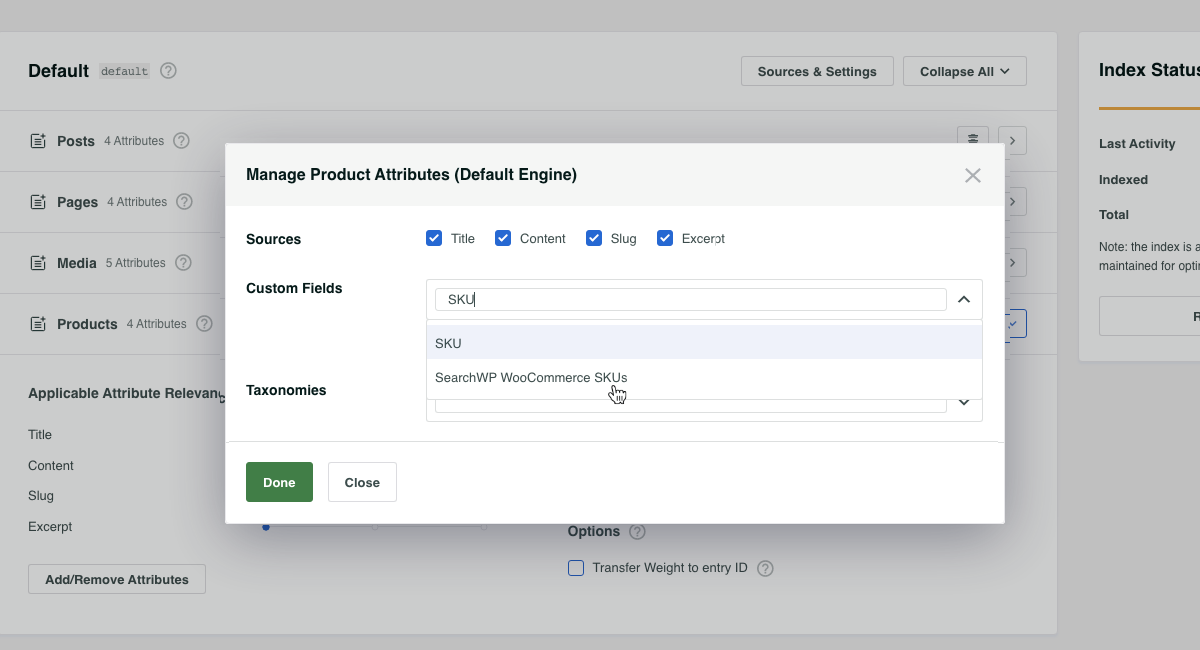
Con lo snippet in posizione, ora possiamo aggiungere SKU WooCommerce di SearchWP alla nostra Origine Prodotti, rendendo ricercabili tutti gli SKU dei prodotti (e delle variazioni)!